Posso utilizzare Wayback Machine per Instagram?

Instagram è diventato una delle piattaforme più popolari per la condivisione di foto, video, storie e ricordi personali. Da influencer e brand a semplici utenti, milioni di persone si affidano a Instagram per pubblicare contenuti che potrebbero poi scomparire a causa di cancellazione, sospensione dell'account o modifiche alla piattaforma. Questo ha portato molti utenti a porsi una domanda importante: è possibile utilizzare la Wayback Machine per Instagram?
In breve, sì, ma solo in misura limitata. Sebbene la Wayback Machine possa talvolta acquisire pagine pubbliche di Instagram, non è stata progettata specificamente per l'archiviazione di piattaforme di social media come Instagram. Molti post, profili ed elementi dinamici di Instagram non possono essere salvati o accessibili completamente tramite la Wayback Machine.
In questo articolo spiegheremo come funziona Wayback Machine con Instagram, i suoi limiti e presenteremo uno strumento di archiviazione specifico per la conservazione di profili e post di Instagram.
1. Wayback Machine funziona su Instagram?

Internet Archive ha creato la Wayback Machine per conservare istantanee delle pagine web nel corso del tempo. Permette agli utenti di visualizzare le versioni archiviate dei siti web, anche dopo che le pagine originali sono state modificate o sono scomparse.
In teoria, le pagine Instagram possono essere archiviate se sono accessibili al pubblico. Ad esempio, una pagina profilo Instagram pubblica potrebbe occasionalmente comparire nell'archivio di Wayback Machine. Gli utenti possono inserire l'URL di Instagram nella barra di ricerca di Wayback Machine per verificare se esistono delle istantanee.
Tuttavia, Instagram presenta diverse sfide tecniche che rendono difficile l'archiviazione web.
2. Perché Wayback Machine ha problemi ad archiviare Instagram
2.1 Instagram utilizza contenuti dinamici
Instagram carica gran parte dei suoi contenuti dinamicamente utilizzando script e API. A differenza delle tradizionali pagine web statiche, i profili Instagram caricano continuamente i contenuti man mano che gli utenti scorrono la pagina.
La Wayback Machine ha difficoltà a gestire questi elementi dinamici perché cattura principalmente la struttura HTML di una pagina anziché renderizzare completamente i contenuti interattivi. Di conseguenza, le pagine Instagram archiviate potrebbero apparire incomplete o non funzionanti.
2.2 Molte pagine Instagram richiedono l'accesso
Instagram spesso richiede agli utenti di effettuare l'accesso prima di poter visualizzare profili, commenti o contenuti multimediali. Poiché la Wayback Machine non può aggirare le restrizioni di accesso, molte istantanee archiviate potrebbero mostrare solo informazioni limitate.
Gli account privati sono completamente inaccessibili alla Wayback Machine.
2.3 Le immagini e i video potrebbero non essere salvati correttamente
Anche se una pagina Instagram viene archiviata, i file multimediali effettivi potrebbero non essere sempre conservati. Gli utenti spesso riscontrano immagini mancanti, video non disponibili o sezioni vuote nelle pagine Instagram archiviate.
Questo accade soprattutto con Storie, Reel e post a carosello.
2,5 Instagram blocca alcuni crawler
Le piattaforme di social media limitano attivamente la scansione e l'estrazione automatica dei dati per proteggere le informazioni degli utenti e ridurre il carico sui server. I sistemi anti-bot di Instagram possono impedire a Wayback Machine di archiviare correttamente le pagine.
Per questo motivo, molti URL di Instagram non restituiscono alcuna immagine.
3. Cosa si può effettivamente archiviare con Wayback Machine?
La Wayback Machine potrebbe funzionare per:
- Pagine del profilo Instagram pubbliche
- Informazioni di base del profilo
- Alcuni post pubblici
- URL di Instagram più vecchi che sono stati precedentemente analizzati
Per gli utenti che necessitano solo di una copia occasionale del loro passato, Wayback Machine può ancora essere utile. Ma per un'archiviazione seria di Instagram, uno strumento dedicato offre risultati decisamente migliori.
4. Prova il miglior strumento per archiviare post e profili Instagram — Swyshare Kit di archiviazione
Se vuoi preservare in modo affidabile i contenuti di Instagram, Swyshare Kit di archiviazione offre una soluzione molto più potente rispetto alla Wayback Machine.
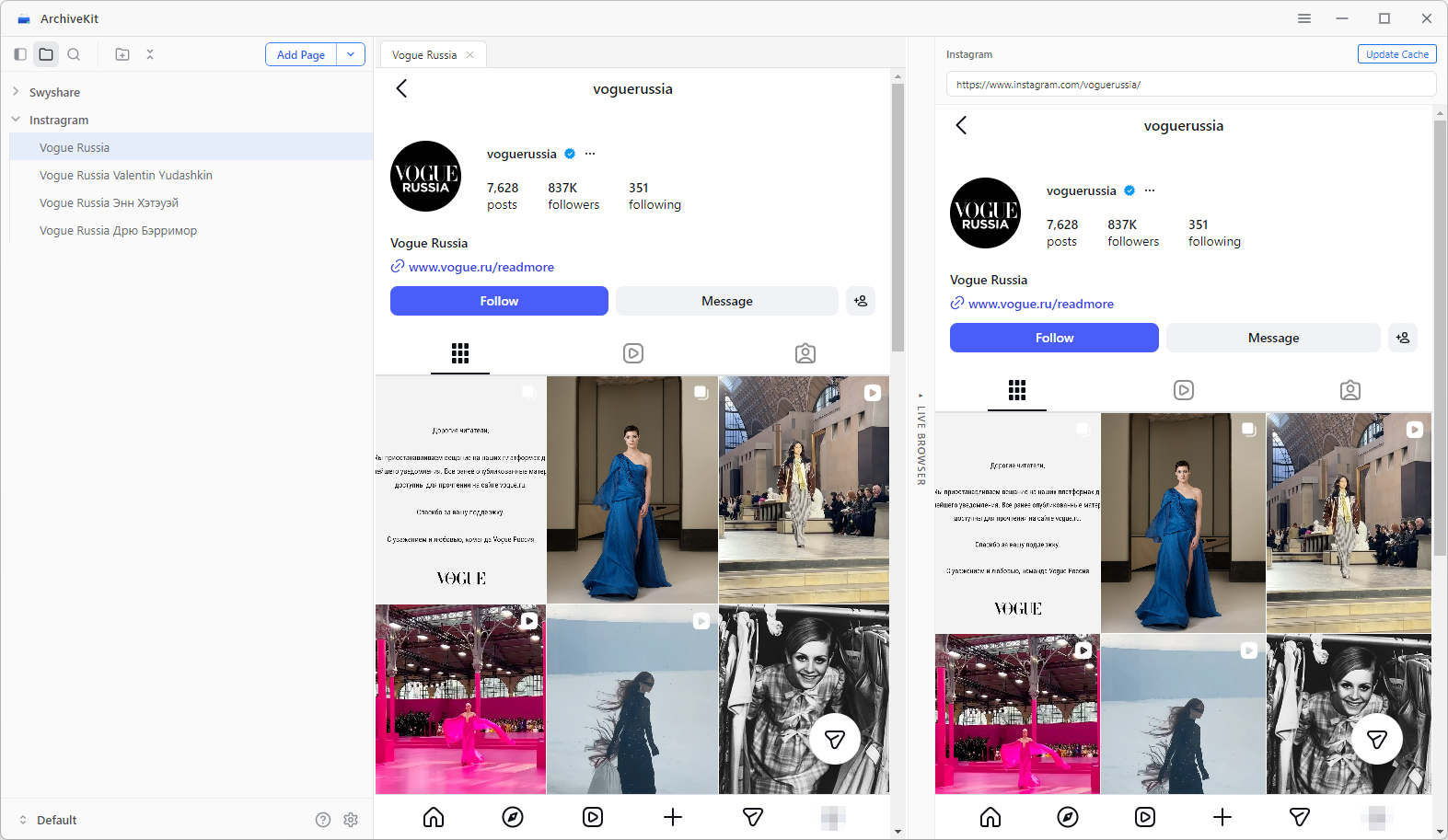
ArchiveKit è uno strumento completo per l'archiviazione di pagine web e social media, progettato per salvare i contenuti online esattamente come appaiono. A differenza dei tradizionali archivi web, ArchiveKit si concentra sulla conservazione completa della pagina, inclusi gli elementi dinamici e i contenuti multimediali.
Ecco alcuni dei principali vantaggi dell'utilizzo di ArchiveKit per l'archiviazione di Instagram:
- Conservare le pagine Instagram complete esattamente come appaiono online.
- Archivia più post e profili Instagram contemporaneamente
- Utilizza la modalità Live Browser per caricare pagine protette da login e contenuti dinamici.
- Organizza le pagine archiviate in cartelle personalizzate
- Cerca e individua facilmente i contenuti archiviati in qualsiasi momento.
Come archiviare le pagine Instagram con ArchiveKit:
- Scarica e installa Swyshare Installa ArchiveKit sul tuo computer Windows o Mac, quindi avvia il software.
- Apri la scheda Live Browser, incolla l'URL della pagina Instagram nel browser e accedi al tuo account Instagram, se richiesto.
- Scorri la pagina per caricare completamente il contenuto, quindi fai clic su "Aggiungi pagina" e seleziona "Archivio profondo" per avviare il salvataggio della pagina.
- Organizza, cerca e accedi alle tue pagine Instagram archiviate offline in qualsiasi momento.
5. Wayback Machine contro ArchiveKit
| Caratteristica | Wayback Machine | Kit di archiviazione |
|---|---|---|
| Archivio dei profili Instagram | Limitato | SÌ |
| Salva contenuti dinamici | Debole | Un sostegno più forte |
| Archiviazione di massa | NO | SÌ |
| Visualizzazione offline | Limitato | SÌ |
| Salva le immagini | Spesso incompleto | Migliore conservazione |
| Organizzazione semplice | Minimo | SÌ |
| Rendering moderno del browser | NO | SÌ |
6. Conclusion
La Wayback Machine a volte riesce ad archiviare post e profili pubblici di Instagram, ma i risultati sono spesso incompleti a causa dei contenuti dinamici di Instagram, dei requisiti di accesso e delle protezioni anti-indicizzazione.
Se hai bisogno di un modo più affidabile per conservare i contenuti di Instagram,
Swyshare
Kit di archiviazione
è una delle migliori alternative disponibili. Con funzionalità come l'importazione di URL in blocco, la modalità Live Browser, l'acquisizione di pagine intere e l'accesso offline, ArchiveKit offre una soluzione più pratica per archiviare i contenuti moderni di Instagram.
Sia che tu voglia conservare post importanti, monitorare i contenuti dei social media o costruire un archivio personale, Kit di archiviazione Rende l'archiviazione di Instagram più veloce, più semplice e più affidabile rispetto ai tradizionali servizi di archiviazione web.